Your Questions, Answered
We’ve assembled the most frequently asked questions about Eversense into one place. Got a question that you can’t find the answer to? Contact us.
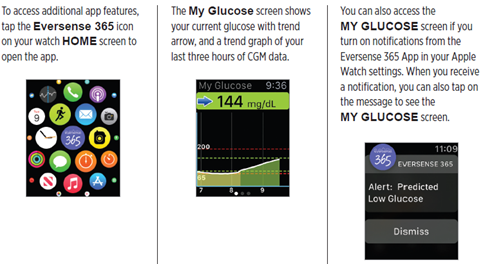
You can view a snapshot of your Eversense® CGM data on your Apple Watch®. Once you’ve downloaded and installed the Eversense® mobile app on your mobile device, follow the Apple Watch® instructions for adding the app to your watch.
NOTE: Wearable devices using Android operating systems are not currently compatible.
The Apple Watch® is a secondary display of Eversense® CGM data and should not be used in place of the primary Eversense® CGM display. The Watch cannot be used to connect to the smart transmitter directly.
Any problems with mobile devices, wireless internet, data connection, the Eversense® Data Management System (DMS), the CGM user’s smart transmitter out of range of their mobile device, or charging their smart transmitter may cause data transfer to be delayed or not to be displayed.
1. Charge the smart transmitter. Wait until the LED is blinking green or solid green.
2. While connected to the charger, touch and hold the transmitter’s soft-touch button (for approx. 14 seconds). The LED will be white. Remove your finger from the transmitter when the LED changes from white to orange.
3. The LED will start blinking in a few seconds indicating the smart transmitter is going through a self-test sequence. The LED will blink in various colors. Once the self test is complete, the smart transmitter will vibrate and blink green indicating it is now charging.
4. If the self-test does not complete, repeat steps 1 through 3.
5. If step 3 is successfully completed, the smart transmitter is now ready for use.
At this time, Eversense® CGM System is not integrated with (insulin pumps/pens/closed loop systems). We completely understand the importance of integrations with devices. Discussions with potential partners are ongoing, however compatibility with ___ (if brand mentioned acknowledge it, if not say “your pump”) is not available at this time. Once we have an update on this, we will be sure to announce it.
It is safe for you to wear your sensor and smart transmitter when you go through metal detectors at airports. While flying, the smart transmitter performs similar to any other Bluetooth® device. Be sure to follow the specific safety guidelines mandated by the airline.
For help with interpreting your glucose information, the best resource is your healthcare professional. For questions about the Apple Health app reports, you can visit the Apple website or Apple Customer Support.
Website: support.apple.com Tollfree: 1-800-MY-APPLE
To have Apple call you: https://getsupport.apple.com/solutions/call
We are limited to how much we can troubleshoot questions regarding the Apple Health app, however, I can provide you with the website and phone number of Apple support.
Website: support.apple.com Tollfree: 1-800-MY-APPLE
Still have questions?
The Eversense team is dedicated and ready to provide the answers and support you need. Simply click the link below.
The Eversense® 365 Continuous Glucose Monitoring (CGM) System is indicated for continually measuring glucose levels for up to one year in people (18 years and older) with diabetes. The system is indicated for use to replace fingerstick blood glucose (BG) measurements for diabetes treatment decisions. Fingerstick BG measurements are required for calibration one time a week after day 13, and when symptoms do not match CGM information or when taking medications of the tetracycline class. The sensor insertion and removal procedures are performed by a health care provider. The Eversense 365 CGM System is a prescription device; patients should talk to their health care provider to learn more.
For important safety information, see bit.ly/eversensesafety
Eversense, Eversense 365 Continuous Glucose Monitoring, and the Eversense logo are trademarks of Senseonics, Incorporated. All other trademarks are properties of their respective owners and are used solely for informative purposes. No relationship or endorsement should be inferred or implied.
Apple Watch® is a product of Apple, Inc., and may be separately purchased from an authorized Apple retailer. Apple Watch is not included with the Eversense CGM System. Android is a trademark of Google LLC.
MKT-001692 Rev 1


 Call My Eversense Specialist Now
 Schedule a Call