Your Questions, Answered
We’ve assembled the most frequently asked questions about Eversense into one place. Got a question that you can’t find the answer to? Contact us.
You should avoid massage therapy near the inserted sensor site. Massage therapy near the sensor site could cause discomfort or skin irritation.
Manual blood glucose entries cannot be edited. Meals, Insulin, Health, and Exercise icons may be edited by going to the Event log and tapping on the entry.
An event icon can be modified or hidden after it was previously saved. From the Event Log, click on the event icon you would like to modify. Once the changes are made, tap Save.
To remove an event icon, select the event icon you would like to modify, scroll down to the bottom of the page and select “Hide Event”. This will remove the event icon from the home page.
Manual blood glucose (BG) Entry:
⮚ Can be hidden
⮚ Cannot be edited
⮚ Cannot be deleted
Events:
⮚ Can be hidden
⮚ Can be edited
⮚ Cannot be deleted
Pinch in and out on the screen to display different day/time ranges on the trend graph. You can view as few as 3 hours or up to 3 days of information on the My Glucose screen.
You can view the trend graph in either portrait or landscape mode. In landscape mode, there are shortcut buttons to see 7, 14, 30 and 90 day views and to email the graph.
High priority alerts include:
- Transmitter error
- Sensor replacement
- Battery empty
- High sensor temperature
- Low sensor temperature
- High transmitter temperature
- No sensor detected
- Low glucose
- Out of range low glucose
- Out of range high glucose
- Low battery
- Vibration motor
- Transmitter replacement
- Battery error
- Incompatible transmitter
- Sensor file
- Sensor linking error
- Sensor linking failed
- Sensor connection
- Pairing error
- Sensor sync confirmed
- Connection lost
- Glucose suspend alert
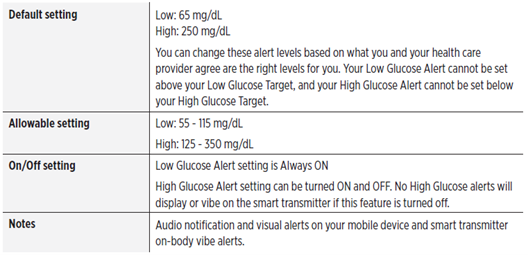
Yes. Your Eversense® 365 CGM System will alert you when your glucose levels are outside the alert settings you choose. When you have reached your low and high glucose alert levels, the smart transmitter vibrates, and the mobile app gives an audible alert as well as displays a message on the screen. You should immediately perform a finger stick blood glucose test before making a treatment decision.
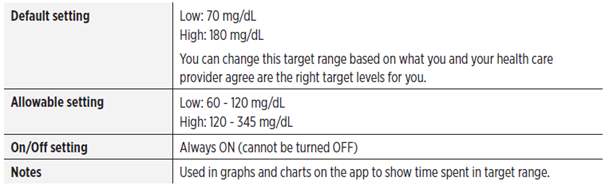
Yes. Glucose Targets are the low and high levels of the range you are aiming for throughout the day. These settings are used in the app to indicate when glucose values are in your target range.
Note: Target range values must be set within alert range values. Do not change your glucose alert levels without consulting with your health care professional.
Still have questions?
The Eversense team is dedicated and ready to provide the answers and support you need. Simply click the link below.
The Eversense® 365 Continuous Glucose Monitoring (CGM) System is indicated for continually measuring glucose levels for up to one year in people (18 years and older) with diabetes. The system is indicated for use to replace fingerstick blood glucose (BG) measurements for diabetes treatment decisions. Fingerstick BG measurements are required for calibration one time a week after day 13, and when symptoms do not match CGM information or when taking medications of the tetracycline class. The sensor insertion and removal procedures are performed by a health care provider. The Eversense 365 CGM System is a prescription device; patients should talk to their health care provider to learn more.
For important safety information, see bit.ly/eversensesafety
Eversense, Eversense 365 Continuous Glucose Monitoring, and the Eversense logo are trademarks of Senseonics, Incorporated. All other trademarks are properties of their respective owners and are used solely for informative purposes. No relationship or endorsement should be inferred or implied.
Apple Watch® is a product of Apple, Inc., and may be separately purchased from an authorized Apple retailer. Apple Watch is not included with the Eversense CGM System. Android is a trademark of Google LLC.
MKT-001692 Rev 1


 Call My Eversense Specialist Now
 Schedule a Call