Your Questions, Answered
We’ve assembled the most frequently asked questions about Eversense into one place. Got a question that you can’t find the answer to? Contact us.
Non-clinical testing has demonstrated the Eversense® 365 Sensor is MR Conditional. A patient with this device can be safely scanned in an MR system meeting the following conditions:
- Static magnetic field of 1.5T or 3.0T
- Maximum spatial field gradient of 30 T/m (3000 gauss/cm).
- For 1.5 T and 3T MR Scanner: Whole-body specific absorption rate (SAR) ≤ 2 W/kg
The Eversense® Smart Transmitter is MR Unsafe and MUST BE REMOVED before undergoing an MRI procedure. Before you undergo an MRI procedure, tell the MRI staff that you have an Eversense Sensor and Smart Transmitter.
Mannitol or sorbitol, when administered intravenously, or as a component of an irrigation solution or peritoneal dialysis solution, may increase blood mannitol or sorbitol concentrations and cause falsely elevated readings of your sensor glucose results. Sorbitol is used in some artificial sweeteners, and concentration levels from typical dietary intake do not impact sensor glucose results.
The Apple Health app stores up to 90 days of glucose data. When you connect your Eversense® App to the Apple Health app, the last 90 days of glucose data will be shared with Apple Health.
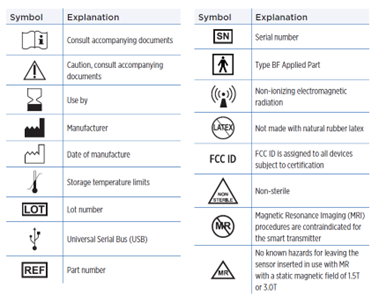
Note: The Use by date is not an expiration date. A sensor may be inserted and a smart transmitter may be linked for the first time, up to the Use by date.
Antibiotics of the tetracycline class may falsely lower sensor glucose readings. You should not rely on sensor glucose readings while taking tetracyclines.
Only the Eversense® 365 Transmitter is covered by a 1 year warranty.
Still have questions?
The Eversense team is dedicated and ready to provide the answers and support you need. Simply click the link below.
The Eversense® 365 Continuous Glucose Monitoring (CGM) System is indicated for continually measuring glucose levels for up to one year in people (18 years and older) with diabetes. The system is indicated for use to replace fingerstick blood glucose (BG) measurements for diabetes treatment decisions. Fingerstick BG measurements are required for calibration one time a week after day 13, and when symptoms do not match CGM information or when taking medications of the tetracycline class. The sensor insertion and removal procedures are performed by a health care provider. The Eversense 365 CGM System is a prescription device; patients should talk to their health care provider to learn more.
For important safety information, see bit.ly/eversensesafety
Eversense, Eversense 365 Continuous Glucose Monitoring, and the Eversense logo are trademarks of Senseonics, Incorporated. All other trademarks are properties of their respective owners and are used solely for informative purposes. No relationship or endorsement should be inferred or implied.
Apple Watch® is a product of Apple, Inc., and may be separately purchased from an authorized Apple retailer. Apple Watch is not included with the Eversense CGM System. Android is a trademark of Google LLC.
MKT-001692 Rev 1


 Call My Eversense Specialist Now
 Schedule a Call