Your Questions, Answered
We’ve assembled the most frequently asked questions about Eversense into one place. Got a question that you can’t find the answer to? Contact us.
Events can be added later from the MY GLUCOSE screen with a single tap anywhere on the graph area. You will be able to adjust the date and time of the event.
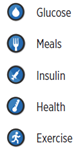
You can also add Notes to each of the Event types if there is additional information you would like to include.
NOTE: The Notes that are added in the App are not viewable in DMS. The notes are only available in the App.
The Smart Transmitter sends glucose data via Bluetooth® to your mobile device running the Eversense® App.
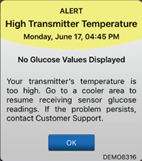
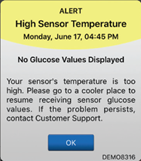
In extreme temperature, the system will present a High Sensor or High Transmitter Temperature Alert. Once the condition changes back to normal operating range, the system will display glucose values again.
Smart Transmitter:
An alert appears every 20 minutes when your smart transmitter temperature is too high. No glucose reading is displayed until the smart transmitter temperature is within normal operating conditions. Reduce the smart transmitter temperature by moving to a cooler environment. Once the smart transmitter temperature is below 42 °C (108 °F), it will resume displaying glucose values. You may temporarily remove the smart transmitter to cool it down. Once the smart transmitter is back to a lower temperature, be sure to replace it over the sensor.
Sensor:
The High Sensor Temperature Alert will appear every 20 minutes when the sensor temperature is too high. No glucose reading is displayed until the sensor temperature is within normal operating conditions. Go to a cooler environment to reduce the sensor temperature. Briefly remove the smart transmitter while the sensor temperature cools to between 26 - 40° C (81 - 104 °F). Then put the smart transmitter back on to start receiving glucose values again from the sensor. When you place the smart transmitter back on the sensor site, it may take up to 10 minutes for sensor communication to re-start and for glucose readings to appear in the app.
The Eversense® 365 Starter Kit includes:
- Sensor Kit (Used by the HCP only)
- Pouch with the Sensor inside of a sensor holder
- Smart Transmitter Kit
- Smart Transmitter
- Charging Accessories (Micro USB Cable and Wall Plug)
- User Guide
- Quick Reference Guide
- Medical Device Card (for your wallet)
- Next Steps Sheet
- Adhesive Patch Kit
- 300 White Adhesives
- 90 Clear Adhesives
Insertion Tools Kit (Used by the HCP performing the insertion)
Still have questions?
The Eversense team is dedicated and ready to provide the answers and support you need. Simply click the link below.
The Eversense® 365 Continuous Glucose Monitoring (CGM) System is indicated for continually measuring glucose levels for up to one year in people (18 years and older) with diabetes. The system is indicated for use to replace fingerstick blood glucose (BG) measurements for diabetes treatment decisions. Fingerstick BG measurements are required for calibration one time a week after day 13, and when symptoms do not match CGM information or when taking medications of the tetracycline class. The sensor insertion and removal procedures are performed by a health care provider. The Eversense 365 CGM System is a prescription device; patients should talk to their health care provider to learn more.
For important safety information, see bit.ly/eversensesafety
Eversense, Eversense 365 Continuous Glucose Monitoring, and the Eversense logo are trademarks of Senseonics, Incorporated. All other trademarks are properties of their respective owners and are used solely for informative purposes. No relationship or endorsement should be inferred or implied.
Apple Watch® is a product of Apple, Inc., and may be separately purchased from an authorized Apple retailer. Apple Watch is not included with the Eversense CGM System. Android is a trademark of Google LLC.
MKT-001692 Rev 1


 Call My Eversense Specialist Now
 Schedule a Call