Your Questions, Answered
We’ve assembled the most frequently asked questions about Eversense into one place. Got a question that you can’t find the answer to? Contact us.
No. While you may optionally calibrate the Eversense® 365 system more frequently, (daily calibrations entries must be spaced at least one hour apart), this will not impact the accuracy of the system.
The best way for a user to support system accuracy is to calibrate as prompted and to always calibrate the system using only a finger stick blood sample. DO NOT calibrate at times when glucose may be rapidly changing (e.g., after meals, after dosing insulin). DO NOT use a blood glucose reading from an alternative site (such as forearm or palm) blood glucose reading to calibrate the system.
While factory calibration is possible for some short-term transcutaneous sensors that last 2 weeks or less, a long-term implantable sensor lasting up to 12 months - essentially 26 times longer - requires calibration to ensure the system provides the most accurate readings possible.
On Day 1, no fingerstick calibrations are required for the first 24 hours.
Day 2 will require 4 calibrations within 36 hours for the initialization phase.
Then the Eversense® 365 requires one calibration per day from Day 3 through Day 13.
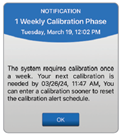
Beginning on Day 14, the sensor will only require one calibration per week thereafter for the life of the sensor.
The most recent 90 days of your glucose data is stored in the app. Uninstalling/re-installing the app will clear all the data from the mobile device and only the most recent three days’ worth of glucose data will be retrieved from the smart transmitter and stored in the app.
On day 14 and beyond, after a successful calibration, you’ll be notified if the calibration frequency changes.
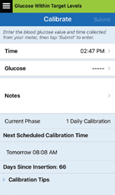
Additionally, the Calibrate screen (Menu → Calibrate) will always indicate the current phase that the system is in.
The process for inserting the long-term sensor under the skin creates minor tissue changes around the sensor that take some time to return to normal. Daily calibrations help support the best possible CGM accuracy during this time.
Still have questions?
The Eversense team is dedicated and ready to provide the answers and support you need. Simply click the link below.
The Eversense® 365 Continuous Glucose Monitoring (CGM) System is indicated for continually measuring glucose levels for up to one year in people (18 years and older) with diabetes. The system is indicated for use to replace fingerstick blood glucose (BG) measurements for diabetes treatment decisions. Fingerstick BG measurements are required for calibration one time a week after day 13, and when symptoms do not match CGM information or when taking medications of the tetracycline class. The sensor insertion and removal procedures are performed by a health care provider. The Eversense 365 CGM System is a prescription device; patients should talk to their health care provider to learn more.
For important safety information, see bit.ly/eversensesafety
Eversense, Eversense 365 Continuous Glucose Monitoring, and the Eversense logo are trademarks of Senseonics, Incorporated. All other trademarks are properties of their respective owners and are used solely for informative purposes. No relationship or endorsement should be inferred or implied.
Apple Watch® is a product of Apple, Inc., and may be separately purchased from an authorized Apple retailer. Apple Watch is not included with the Eversense CGM System. Android is a trademark of Google LLC.
MKT-001692 Rev 1


 Call My Eversense Specialist Now
 Schedule a Call